
How to Use an AI Symptom Checker Before a Doctor Visit (Step-by-Step)
Walking into an appointment with a clear, organized picture of what you’re feeling makes for a better visit — and an AI symptom checker is a fast way to build that picture. In a few minutes it reads your symptoms, asks the follow-up questions a clinician would, and hands you a structured summary plus a suggested next step, an approach consistent with guidance from the U.S. Centers for Disease Control and Prevention on knowing when symptoms need urgent attention.
Preparation works best alongside knowing whether AI can replace your doctor and spotting emergency red-flag symptoms.
Used the right way, it helps you prepare and triage — decide whether to book a routine visit, choose urgent care, or seek emergency help. Used the wrong way, it can mislead. This guide shows how to use one safely.
Medical disclaimer: An AI symptom checker is not a substitute for a licensed physician and does not provide a diagnosis. Call 911 (US) — or your local emergency number — for emergencies; if you have red-flag symptoms, seek immediate care. Always follow up with a doctor.

What an AI Symptom Checker Does — and What It Doesn’t
An AI-powered symptom checker sits between «I don’t feel well» and «I know what to do next.» It doesn’t replace medical judgment — it organizes your situation so a real judgment call, yours or your doctor’s, is easier to make.
It organizes symptoms and suggests a next step
An AI-powered symptom checker analyzes the symptoms you enter, asks clinician-style follow-up questions about severity, triggers, and accompanying symptoms, and returns a structured list of possible causes plus one clear recommendation:
- Self-care at home
- Book a routine doctor visit
- Go to urgent care
- Seek emergency care
Most tools finish in two to three minutes and personalize questions by biological sex, age, and history — some run a quick three-minute questionnaire, others ask up to eight questions in under two minutes.
It does not diagnose or replace your doctor
This is the core rule. No AI symptom checker legally makes a diagnosis or prescribes treatment — it offers possibilities and triage guidance, not a verdict. The final diagnosis needs a licensed clinician with full context: a physical exam, your history, and often lab or imaging tests. Treat the output as a preparation aid, never as an answer, and always confirm it with a doctor.
How to Prepare Before You Open the Tool
Good input produces a good summary. A few minutes of preparation before you open an online symptom checker changes how useful the result will be.
Write down every symptom — even the «minor» ones. Take two minutes and list everything you’re experiencing, including symptoms that seem unrelated to your main complaint. AI checkers do best with complete input; leaving out a symptom that feels small can change the suggested next step.
Note onset, severity, and triggers. For each symptom, record when it started, how intense it is on a 1-10 scale, and what makes it better or worse. Keeping a short symptom diary for seven to ten days, rating severity daily, gives the tool — and later your doctor — a clearer pattern to work from.
Gather your medications and history. List current prescriptions, over-the-counter drugs, supplements, and any known conditions or allergies. This context shapes which follow-up questions the tool asks and how it weighs the possibilities.
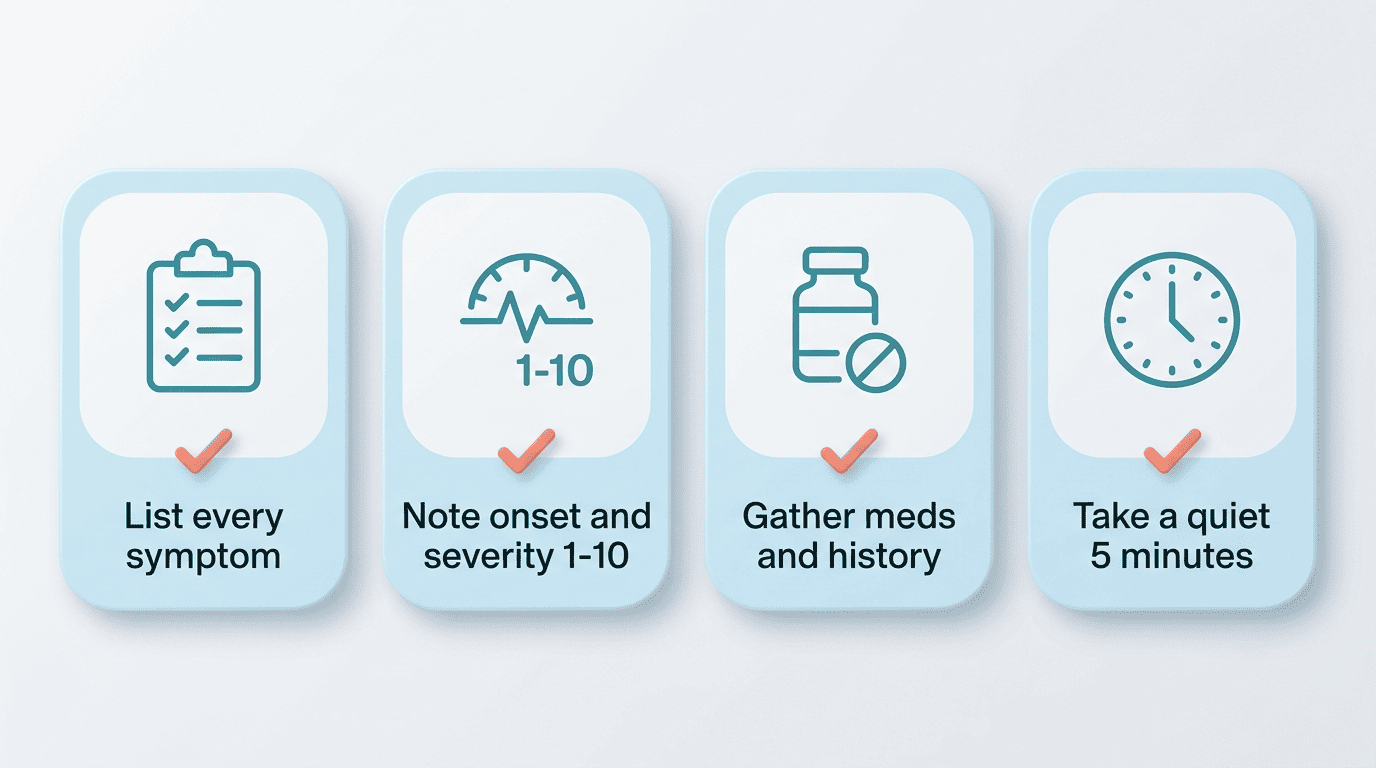
Set aside a quiet five minutes. Rushed answers lower accuracy. Sit somewhere you can focus long enough to answer follow-up questions carefully rather than guessing.
Step-by-Step: Using the AI Symptom Checker
Once you have your notes, the process itself is short. Here’s how to move through it:
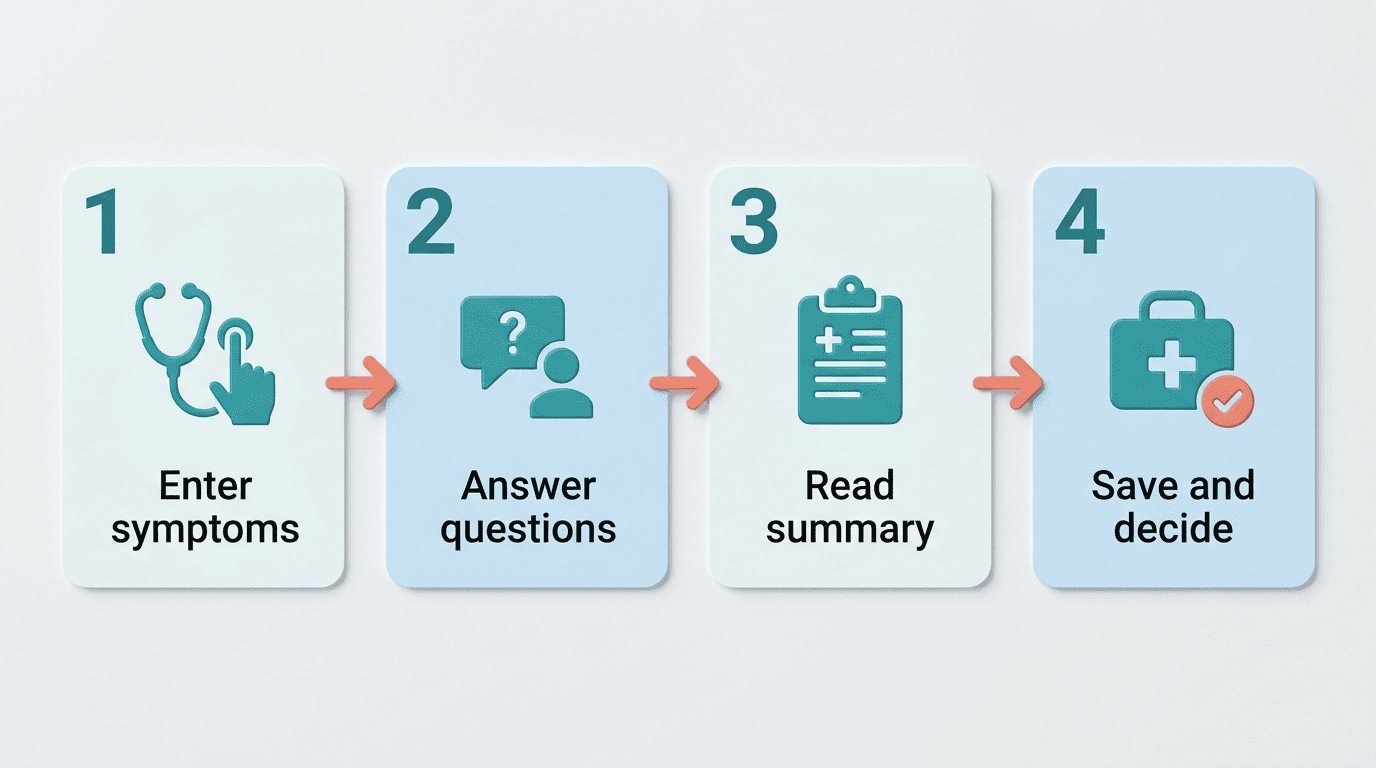
- Enter your main symptoms. Start with your primary complaint and add the rest. Use plain language — «stabbing pain in the lower right belly,» not medical jargon. Many free AI symptom checkers let you enter multiple symptoms at once.
- Answer the follow-up questions honestly. The tool asks what a clinician would ask next: duration, severity, related symptoms, age, sex, existing conditions. Answer accurately, since guesses lower accuracy. Typical flows run three to eight questions and adjust based on your age, sex, and history.
- Read the summary and the recommended next step. You’ll get a structured list of possible conditions and a triage recommendation. This is a probability list, not a diagnosis — often the same combination of symptoms has a common, benign cause, such as a self-limiting viral illness, rather than something serious.
- Save or screenshot the result. Keep the summary on your phone so it’s ready to pull up at your appointment.
- Highlight anything that surprised you. If the tool raises a possibility you hadn’t considered, flag it — that’s often the most useful question to bring to your doctor.
- Note the urgency level it suggests. Whether it points to self-care, a routine visit, urgent care, or emergency room, write that recommendation down alongside your symptoms.
- Decide your next step using the guide below. Combine the tool’s suggestion with the red-flag list and the setting comparison in the next two sections before you act.
Keep the summary or screenshot for your visit — it becomes the backbone of your questions for the doctor, covered later in this guide.
How Accurate Are AI Symptom Checkers?
Accuracy is where an AI-driven symptom checker earns — or loses — trust, and it’s worth understanding the real numbers before you rely on one.
The numbers: helpful, but not diagnostic-grade
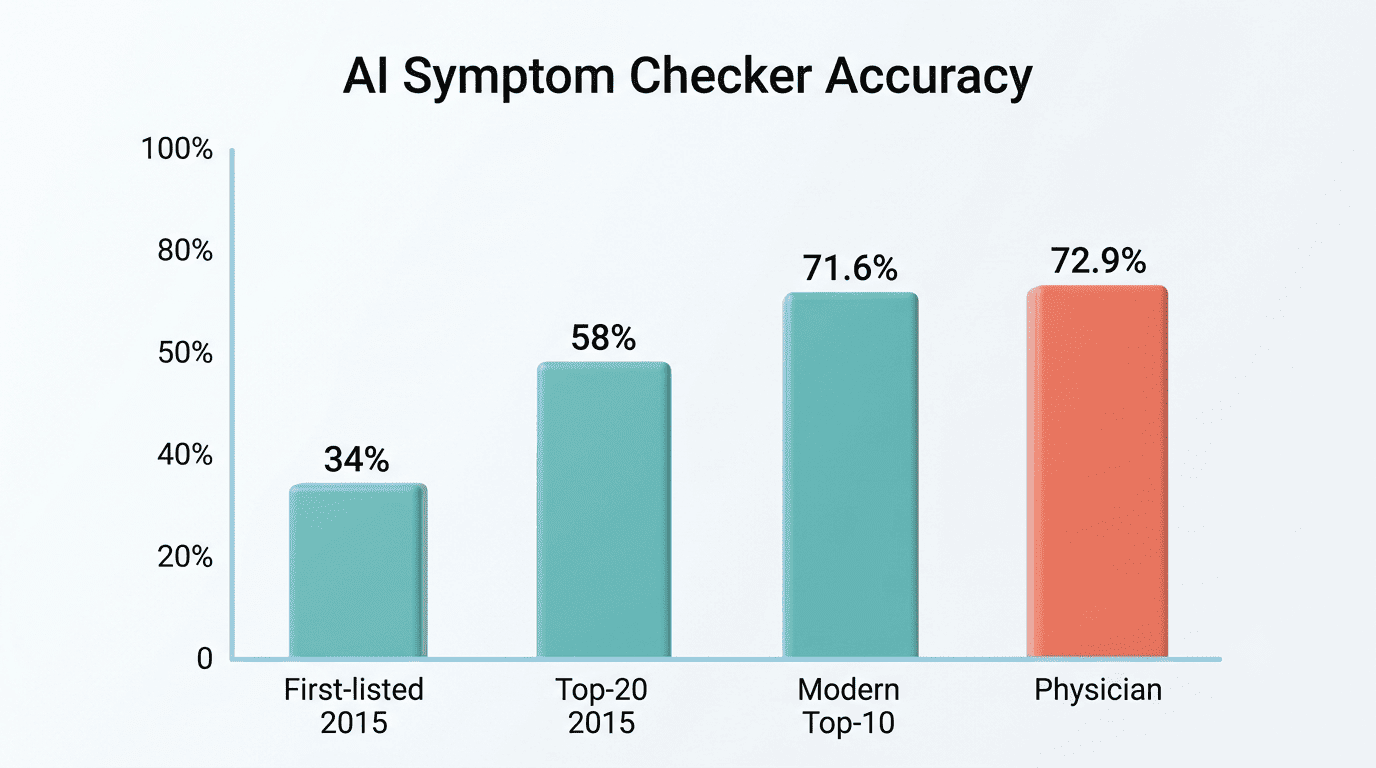
Accuracy varies widely by tool and by how strictly «correct» is counted. An early landmark review of 23 symptom checkers found the correct diagnosis listed first only about a third of the time, though it appeared somewhere in the top 20 possibilities more often; newer, better-designed tools have closed much of that gap. One clinical simulation study found a leading modern checker reached a 71.6% Top-10 hit accuracy, comparable to the median accuracy of physicians evaluating the same cases, findings consistent with the direction of symptom-checker accuracy research indexed on the National Library of Medicine’s PubMed. Use a free AI symptom checker as a well-informed starting point, not the final word.
Why quality varies
A checker is only as good as its underlying data and design. Trustworthy tools are built on clinical guidelines and validated datasets — leading platforms cite development against tens of thousands of clinical publications and review by dozens of practicing doctors, while others train on guidance from bodies like the American Heart Association, the American Medical Association, the CDC, and the World Health Organization. This is also why safety bodies urge caution: the nonprofit patient-safety group ECRI named misuse of AI health chatbots a top health-technology hazard for 2026.
While chatbots are powerful tools, the algorithms cannot replace the expertise, education, and experience of medical professionals.
Dr. Marcus Schabacker, CEO, ECRI
Here’s how reported accuracy benchmarks compare, from an early landmark review to a newer clinical simulation study:
| Benchmark | Reported accuracy |
|---|---|
| Correct diagnosis listed first (2015 review, 23 tools) | ~34% |
| Correct diagnosis within top 20 results (same review) | ~58% |
| Leading modern checker, Top-10 hit rate (clinical simulation study) | ~71.6% |
| Median physician, same case set (same study) | ~72.9% |
Red-Flag Symptoms: When to Skip the Checker and Get Help Now
Some symptoms should never go through a triage tool first. Recognizing them takes seconds and matters more than any app.
Call 911 immediately — don’t wait for an app
If any of these are present, stop and get emergency help right away:
- Chest pain lasting more than a few minutes
- Stroke signs, remembered by the acronym FAST — Face drooping, Arm weakness, Speech difficulty, Time to call emergency services
- Severe difficulty breathing at rest
- Uncontrolled bleeding
- Loss of consciousness or seizures
- A severe allergic reaction known as anaphylaxis
Emergency numbers vary by country:
- United States — 911
- United Kingdom — 999
- European Union — 112
- Australia — 000
- India — 108 (ambulance)
Other urgent red flags
Also seek immediate care for the «worst headache of your life,» a fever above 101.3°F combined with severe headache and neck stiffness, chest pain with shortness of breath and dizziness, vomiting blood, or any fever in an infant under three months old. An AI symptom checker is not built for true emergencies — when in doubt, get care rather than checking symptoms first.
Triage: ER, Urgent Care, Telehealth, or Wait?
A big value of an AI-powered triage tool is helping you pick the right care setting once you’ve ruled out an emergency.
Match the setting to the severity
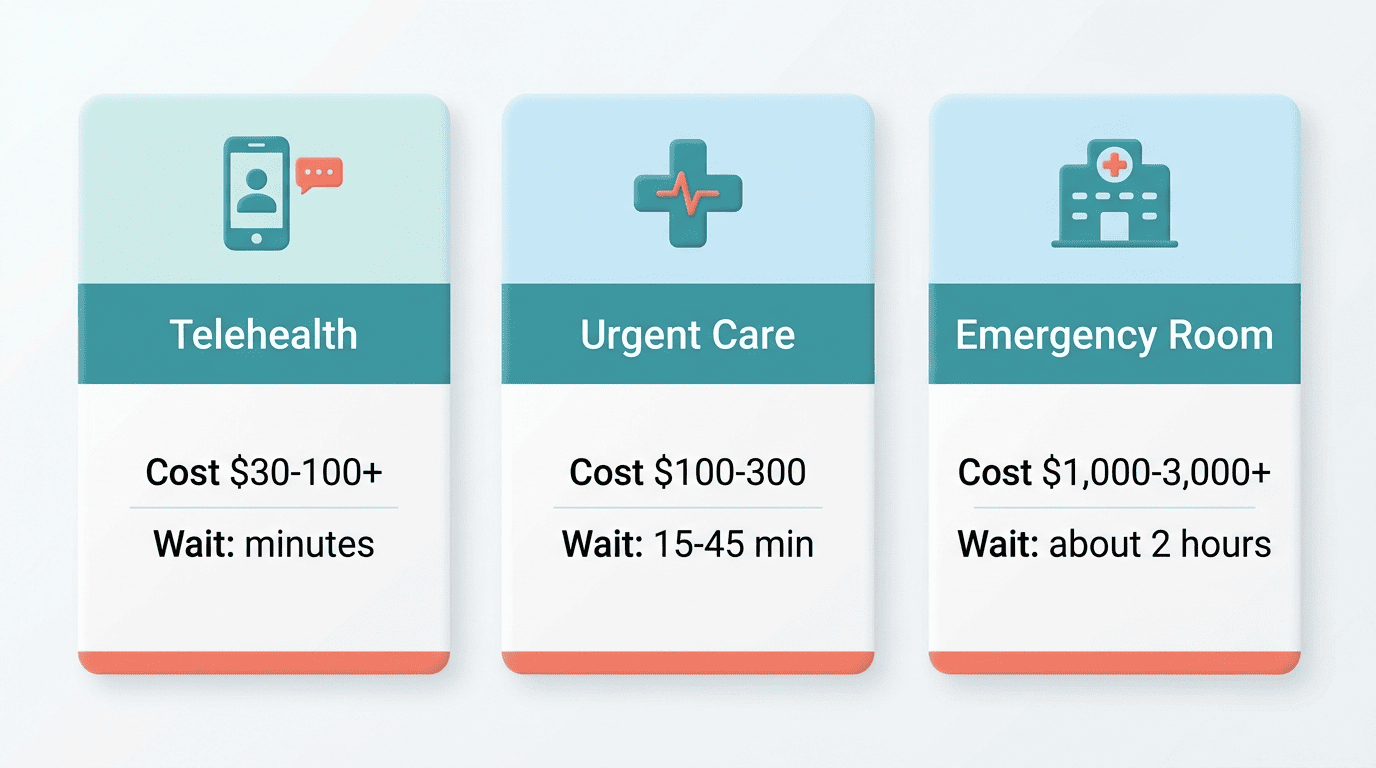
As a rough guide in the United States, before insurance, telehealth typically runs about $30-100 or more, urgent care runs about $100-300 (commonly around $200), and an ER visit runs $1,000-3,000 or more, with severe cases exceeding $5,000. Wait times differ too — ER visits often run two hours or longer depending on triage priority, versus roughly 15-45 minutes at urgent care. Let the tool’s recommendation, plus your own judgment, guide the choice, and use an AI-powered symptom checker whenever you’re unsure where to go.
| Setting | Typical cost (US, before insurance) | Typical wait | Best for |
|---|---|---|---|
| Telehealth | $30-100+ | Minutes, same day | Mild, non-urgent symptoms |
| Urgent care | $100-300 | 15-45 minutes | Moderate injuries, infections |
| Emergency room | $1,000-3,000+ | ~2 hours | Life-threatening symptoms |
When «wait and monitor» is reasonable
For mild, stable symptoms, the tool may suggest self-care and watchful waiting. If symptoms worsen, don’t improve within a reasonable window, or new ones appear, escalate: book a visit or move up to urgent care rather than waiting longer.
Turn the Result Into a Better Doctor Visit
The real payoff of using a symptom checker shows up in the exam room, where a focused summary can turn a rushed appointment into a productive one.
Bring the summary and your questions
Share the checker’s summary with your clinician and use it to frame questions, such as asking whether specific possibilities it flagged should be ruled out. Bring your symptom diary, medication list, and timeline. This preparation makes a short appointment far more productive, and it mirrors the kind of structured history-taking recommended by clinical bodies like the American Medical Association.

Let the doctor lead the diagnosis
Present the AI output as background, not a conclusion. Your doctor may confirm it, expand on it, or set it aside entirely based on the exam and any tests — that’s expected and normal. The checker’s job was to get you prepared; the diagnosis is theirs to make.
Privacy and Choosing a Safe Free Tool
Before you type sensitive health details into any tool, it’s worth checking how it handles that data.
What to look for
Prefer tools that state clear compliance and explain plainly what they store and for how long. Look for:
- A stated HIPAA compliance policy
- SOC 2 Type II certification, or
- GDPR compliance for EU users
Some free AI symptom checkers run anonymously with no signup required and don’t retain your data, which is a meaningful plus if privacy matters to you.
Free vs paid
A free AI symptom checker is enough for preparation and triage for most people — «free» doesn’t mean lower quality here, since several clinically-built tools cost nothing to use. Judge a tool by its medical sourcing and privacy stance, not by its price tag.